Getting Started with PensionPro and Finch
Last updated: December 16, 2025
Finch's integration with PensionPro automates census data collection by pulling payroll data directly from your plan sponsors' payroll systems. This guide covers what you need to know to get started.
Overview
Instead of sponsors manually exporting and mapping payroll data, Finch:
Connects to their payroll system
Pulls the data automatically
Maps earnings and deductions to PensionPro fields
Sends standard formatted files directly to PensionPro via SFTP
Setup Steps
Complete PensionPro Setup
Your PensionPro environment must be configured to receive Finch files. Follow the setup instructions here:
📄 PensionPro Setup and Requirements for Finch Files
Key requirement: Each client must have their EIN configured in PensionPro.
Set Up Your Finch Dashboard
If you haven't already, complete your dashboard setup:
📄 Get Started with the Finch Dashboard
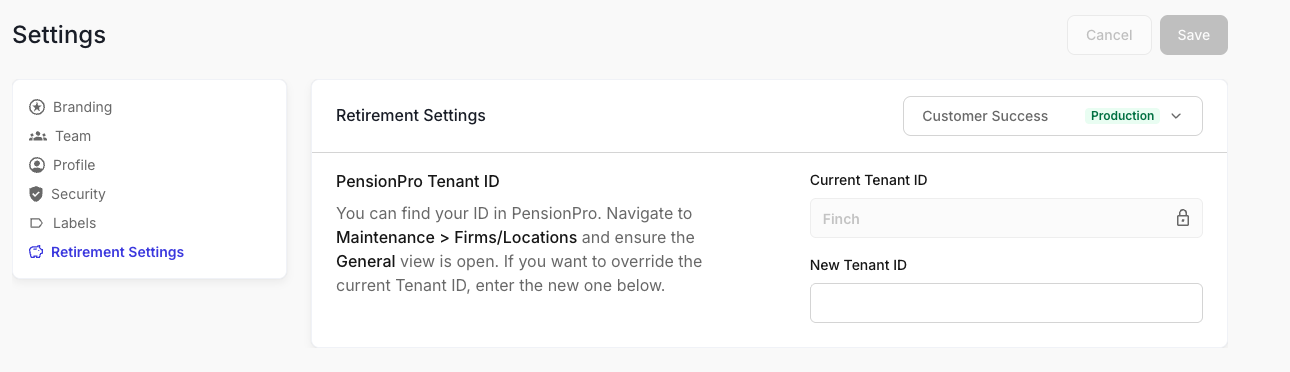
Tenant ID To complete your dashboard setup, you'll need to provide your PensionPro Tenant ID to Finch.
In PensionPro, go to Maintenance > Firms & Locations > Firms to find your tenant ID.
In the Finch Dashboard, go to the settings (upper right) and select Retire Settings. Make the toggle is for your Production application and enter your tenant id. Click Save
Calendar Year vs Fiscal Year Plans - How to set the dates
Calendar year plans (Jan 1 - Dec 31): If Finch is mapping and pushing your files to PensionPro using the standard mappings, this is the date range for the file. They will send the file with this range within 1-2 business days of the connection being created. If you make the connection before the final payroll of the year, you will need to push a new file using the dashboard once all payrolls have completed.
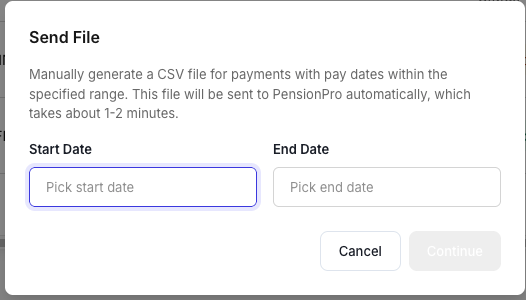
Off cycle plans (any other year-end): Finch connections work for any year-end date. When you're ready to send files, you'll select a custom date range from the Integrations tab at the connection level. There are no additional fees or contract changes required for fiscal year plans. You no longer need to contact our support team to send a file with a custom date range.
Click on a Live connection -> Integrations -> Send File
Timeline for Annual Census Collection
Step 1: Invite Sponsors (Anytime)
Send Finch Connect links to your sponsors so they can authenticate their payroll systems. You can do this in bulk using PensionPro's email blast feature.
Learn how:
📄 Invite Sponsors to Finch Connect
Note: Links default to 90 days and can be refreshed for another 90 days from your dashboard.
Step 2: Monitor Connections
Track authentication progress on your Connections page. Connections move from "Staged" to "Live" once sponsors complete authentication.
Step 3: Verify Mapping (Throughout the year)
Finch automatically maps earnings and deductions from payroll systems to PensionPro file fields. Unless you have requested to do the mapping yourself (recommended), our team will check for new connections each business day, apply standard mappings, and push to PensionPro. If they do this before the end of the plan year, remember to push a new file after all payrolls of the plan years have run. WE recommend that you always review and adjust mapping as needed.
Learn more:
Step 4: Send Files to PensionPro (After final payroll)
For calendar year plans, send files in early January after the final 2025 payroll has processed. You can push files anytime from your dashboard.
Learn how:
📄 Sending Files from Finch to PensionPro
Step 5: Launch Projects in PensionPro
Import the Finch data into your PensionPro project and send Census Requests to sponsors for review and approval.
Learn more:
📄 PensionPro Sponsor Census Collection Process (Team and Business Bundles)
What Data Does Finch Pull?
Finch retrieves all data specified in the PensionPro file format, including:
Employee demographics (name, SSN, DOB, address)
Employment information (hire dates, termination dates, status)
Compensation details (gross, eligible, excluded)
Retirement contributions (pre-tax, Roth, employer match)
Hours worked
And more
See complete list:
📄 PensionPro File Specifications
Supported Payroll Providers
Finch supports 40+ payroll providers for the PensionPro integration, including ADP, Paychex, Paylocity, Gusto, and more.
See full list:
📄 Provider Compatibility - PensionPro
Need Help?
Authentication issues:
Technical support: developers@tryfinch.com