Authentication Troubleshooting
Last updated: December 16, 2025
Each payroll provider handles authentication differently, and plan sponsors may encounter occasional issues when connecting through Finch Connect.
This guide outlines the most common errors, their causes, and how to resolve them.
If you don’t find a solution here, please contact developers@tryfinch.com with:
The company name
A description of the issue
Any relevant screenshots or error messages
You can also CC developers@tryfinch.com in an email thread with your plan sponsor to loop in our technical support team directly.
Finch Connect link does not open
If the plan sponsor reports that the Finch Connect link isn’t opening, try the following steps:
Click the link yourself to confirm whether it opens.
Ask the plan sponsor to copy and paste the link directly into their browser instead of clicking.
Check that a pop-up blocker isn’t preventing the Finch Connect modal from opening.
Try another browser (Chrome, Edge, or Safari recommended).
If the issue persists, email developers@tryfinch.com with the sponsor’s name and a brief description of what happens when they click the link.
“Insufficient permissions” error
Finch Connect requires the user to have administrator-level access in their payroll system to authorize data sharing. If the plan sponsor receives a permissions error, confirm that they hold one of the following roles:
Provider | Required Role / Permission | Notes |
ADP Run | Owner role | Confirm permissions here. |
ADP Workforce Now | Admin who can create a new user and assign the Standard Practitioner role | ADP WFN Cloud is not supported |
Insperity | Employee Administrator with required permissions | Confirm permissions here. |
Justworks | Administrator with required permissions | Confirm permissions here. |
Paychex Flex | Super Admin | Confirm permissions here. |
Paycom | User with permission to manage employee data and payroll settings | Confirm permissions here. |
Paylocity | Company Administrator | Confirm permissions here. Note: Paylocity uses custom admin labels. If a sponsor has admin access but sees an error, send the role and company name to developers@tryfinch.com for help. |
QuickBooks Online | Primary Admin or Company Admin | Confirm permissions here. Note: There must be an available User or Accountant seat before connecting. |
Sequoia One | Admin with specific permissions | Confirm permissions here. |
The link has expired
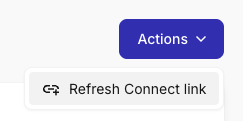
You can refresh the expiration date at anytime from the Finch Dashboard to add another 90 days. Click on any Stage Connection, click on the blue Actions button and select "Refresh Connect link".
Connection Status is "Reauth" - Generate a Re-authentication Link
If you only need annual census data AND the Last Synced date is after January 1 of the current year, then no action is needed at this time. For most connections, if the data has synced on January 1 or later of the current year, then all the data from the previous year has been pulled into our system.
If you do determine that the data is not complete, you can generate a re-authentication link from your dashboard to send to the plan sponsor. Do not make a new connect session as that will require you to redo the mapping and add another billable connection.
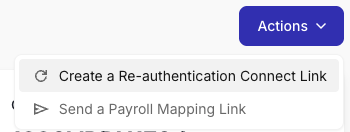
Click on any Live link in the dashboard, then select the blue Actions button and select "Create a Re-authentication Connect Link".
Investigating Failed Authentications
To see detailed information about why an authentication failed for a Staged Connection or a Live connection
Select the live connection or the staged session.
Select "Session History".
Click on the session to open the side bar details
Click on Session Events to see any errors.
If the errors message on the events is not actionable, please email developers@tryfinch.com with the session id (click on session details in the side bar) and the error message.
ADP Run authentication errors
Some versions of ADP Run are not compatible with Finch. You can share
📄 How to Verify Your ADP Run Account is Compatible with your plan sponsors to help them determine if they have a compatible version.