Step 3: DER Setup
Last updated: October 20, 2025
To ensure payroll data is correctly ingested into Relius, set up a Global Data Entry Routine to match the Finch format. Before setting up the DER, ensure the right User Defined Payroll Elements are set up.
1. User Defined Source Mapping
Finch provides data on the following sources. For pay statement details associated to each of these items to correctly be represented in Relius, you must map each of these Finch sources to a User Defined Payroll Element.
Requirements:
Every plan that will be using the Finch integration should have the same User Defined Payroll Element for each source. For example, if User Defined Payroll Element 10 is used for Employee Roth Contribution, each plan should be using User Defined Payroll Element 10 for the Employee Roth Contribution source.
Ensure that all existing plans have been updated to use the Finch DER to avoid issues.
Because the same DER will be used for all Finch plans, ensure that you create a User Defined Payroll Element for any source that appears across your employers. For example, even if only one plan uses Money Purchase, ensure that there is a Payroll Element and that it is a part of the Finch DER.
Recommendations:
Make new User Defined Payroll Elements for Finch sources even if some of these sources are already assigned. For example, you may already have User Defined Payroll Element 8 for Employee Roth Contribution; we recommend creating a new User Defined Payroll Element for Employee Roth Contribution for plans that will be leveraging Finch.
In case you do not have any User Defined Payroll Elements remaining, you will need to delete a few Elements, update any associated plans, and create the Finch Elements instead.
SourceThese are the available Finch sources that can be mapped to a Relius User Defined Payroll Element. Note you may not have all of these for each plan. |
Employee Roth Contribution |
Non-Elective Employer Contribution |
Safe Harbor Match |
Safe Harbor Non-Elective |
Qualified Non-Elective |
Money Purchase |
Employer Roth Match |
2. DER Setup
Make sure that each User Defined Payroll Elements that you set up in Step 1 is assigned to the corresponding Field Order in the table below. This will ensure that the Finch Payroll Column will map to the correct field in Relius. (Replace User Defined x with the User Defined Payroll Element that was set up earlier for the corresponding source.)
Data Entry Routine - Name | Column | Element Name | Format | Max Field Length | Finch Source |
Finch Payroll Import | 1 | Plan ID | Match Relius PlanID | 12 | n/a |
Finch Payroll Import | 2 | Name - First |
| 20 | n/a |
Finch Payroll Import | 3 | Name - Middle |
| 20 | n/a |
Finch Payroll Import | 4 | Name - Last |
| 20 | n/a |
Finch Payroll Import | 5 | Social Security Number | 999999999 (No Hyphens) | 11 | n/a |
Finch Payroll Import | 6 | Address - Street 1 |
| 30 | n/a |
Finch Payroll Import | 7 | Address - Street 2 |
| 30 | n/a |
Finch Payroll Import | 8 | Address - City |
| 30 | n/a |
Finch Payroll Import | 9 | Address - State |
| 30 | n/a |
Finch Payroll Import | 10 | Address - Postal Code |
| 9 | n/a |
Finch Payroll Import | 11 | Date of Birth | YYYY-MM-DD | 10 | n/a |
Finch Payroll Import | 12 | Date of Hire - Original | YYYY-MM-DD | 10 | n/a |
Finch Payroll Import | 13 | Date of Rehire | YYYY-MM-DD | 10 | n/a |
Finch Payroll Import | 14 | Termination Date | YYYY-MM-DD | 10 | n/a |
Finch Payroll Import | 15 | [blank] |
|
| n/a |
Finch Payroll Import | 16 | Pay Frequency Sequence Number |
| 5 | n/a |
Finch Payroll Import | 17 | Pay Begin Date | YYYY-MM-DD | 10 | n/a |
Finch Payroll Import | 18 | Pay End Date | YYYY-MM-DD | 10 | n/a |
Finch Payroll Import | 19 | Pay Frequency Code | B=Biweekly / W=Weekly / M=Monthly / S=Semi-monthly / 2=Sem-annual | 1 | n/a |
Finch Payroll Import | 20 | Gross Earnings |
| 9 | n/a |
Finch Payroll Import | 21 | Current Hours of Service |
| 7 | n/a |
Finch Payroll Import | 22 | Current Deferral $ |
| 9 | n/a |
Finch Payroll Import | 23 | User Defined x $ |
| 9 | Employee Roth Contribution |
Finch Payroll Import | 24 | Loan Payment |
| 9 | n/a |
Finch Payroll Import | 25 | Employer Match |
| 9 | n/a |
Finch Payroll Import | 26 | User Defined x $ |
| 9 | Non-Elective Employer Contribution |
Finch Payroll Import | 27 | User Defined x $ |
| 9 | Safe Harbor Match |
Finch Payroll Import | 28 | User Defined x $ |
| 9 | Safe Harbor Non-Elective |
Finch Payroll Import | 29 | User Defined x $ |
| 9 | Qualified Non-Elective |
Finch Payroll Import | 30 | Employer |
| 9 | Profit Sharing |
Finch Payroll Import | 31 | User Defined x $ |
| 9 | Money Purchase |
Finch Payroll Import | 32 | User Defined x $ |
| 9 | Employer Roth Match |
3. Options Menu
Select the following:
Delimited File Format (defaults to comma - which is correct)
Set Default PIN on Import
Dates:
Recommendation: Do NOT select "Replace existing dates with input"
Use the defaults
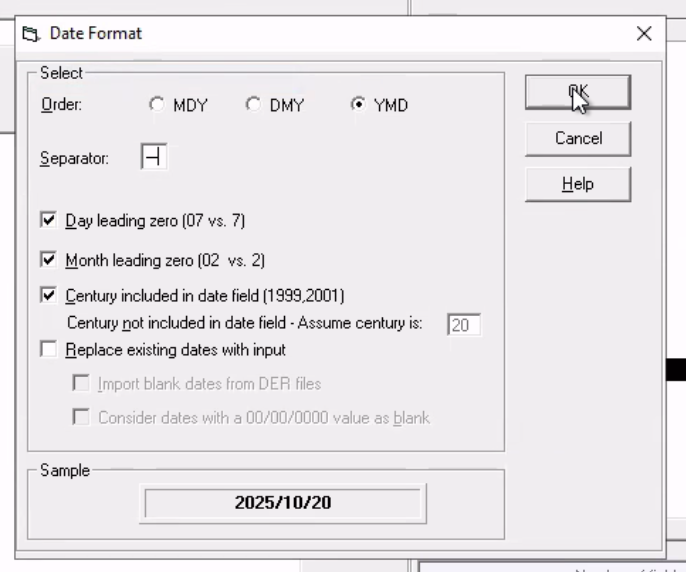
4. Date Format
FAQ
Why is column 15 blank in the DER setup, but shows "Check Date" in the file specifications?
Column 15 is intentionally left blank in the DER setup because of how Relius processes dates differently than other payroll systems.
The file contains both dates for clarity:
Column 15: Check Date (for human review and file transparency)
Column 18: Pay End Date (as defined by the payroll system)
However, Relius processes dates differently:
Relius doesn't have a concept of "check date" as a separate field
What we call "check date" becomes the "pay end date" in Relius
What we call "pay end date" (last date in payroll cycle) isn't used by Relius
Why this matters:
The file shows both dates so clients can manually review payroll information with full context
The DER only maps the Pay End Date (Column 18) because that's what Relius actually processes
Column 15 (Check Date) is included in the file for transparency but isn't mapped in the DER since Relius uses our "check date" as its "pay end date"
In summary: Column 15 is "padded out" (left blank) in the DER because while the data appears in the file for human readability, Relius doesn't need it mapped since it processes dates differently than standard payroll systems.