How multi-entity works
Last updated: September 25, 2026
TL;DR: An entity is a grouping of employees within a payroll system. Entities vary by provider and may be configured by the employer. For example, an entity could be defined by an EIN, company code, division, or location.
One Finch connection can include one or many entities. When you exchange an authorization code for an access token, Finch returns an entity_ids array. Store those IDs alongside the connection and pass one of them on every API request.
How multi-entity works
What is an entity?
An entity is a grouping of employees within a payroll system. The grouping is defined by the employer inside their provider (Gusto, ADP, Workday, etc.) and can be based on:
EIN (Employer Identification Number)
Company code
Division
Location
Any other grouping the payroll system supports
Entity definitions are controlled by the employer, not by Finch. Finch reflects the configuration that already exists in the payroll system. The same provider may represent entities differently across employers, and Finch does not redefine them.
Reference: Entity in the Finch glossary.
How entities relate to connections
A connection is the link between your application and an employer's provider. Each connection corresponds to one employer and is identified by a connection_id.
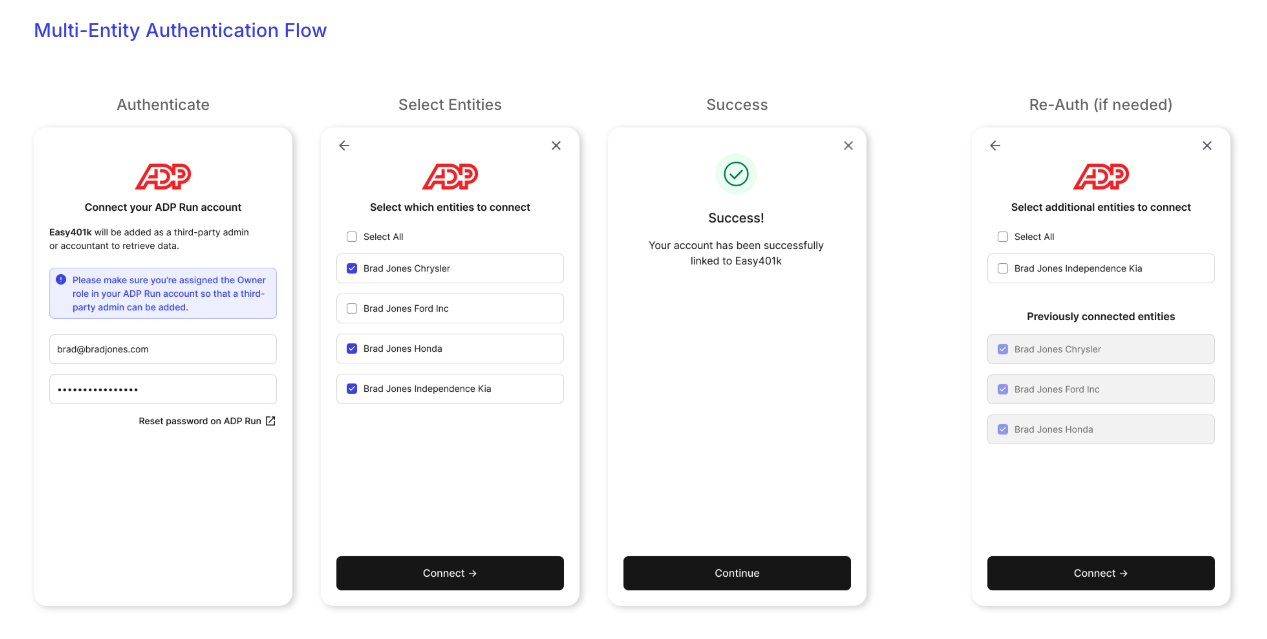
A single connection can include one or many entities — a 1:N relationship between the connection and its entities. When an employer authenticates through Finch Connect, they select which entities to include, and Finch issues one access token per connection that covers every selected entity.
For any employer:
1 employer
1 connection (1
connection_id)1 access token
N entities (N
entity_ids)
Every data request scopes to a specific entity by passing one of the entity IDs in the entity_ids query parameter, on the same access token.
For more on the connection model, see Define connections.
Best practice: store entity_ids from the access token response
This is the most important integration step. When you call /auth/token to exchange an authorization code, the response includes an entity_ids array. Persist these IDs alongside the connection in your database. You will need them on every subsequent data request.
{
  "access_token": "7e965183-9332-423c-9259-3edafb332ad2",
  "connection_id": "bc3a2af9-ce03-46c4-9142-81abe789c64d",
  "products": [
    "directory",
    "employment",
    "individual"
  ],
  "entity_ids": [
    "be67ac3a-bbb1-476b-9131-4088f0039c30",
    "10008ab1-3dce-4cff-8cb9-6d2afc29a1be",
    "303d1671-9348-492f-9b7d-9944fb27654d"
  ],
  "provider_id": "workday"
}
If the employer selected one entity, the array contains a single ID. If they selected multiple, the array lists them all. Either way, the storage pattern is the same — save the array on the connection record at the moment the connection is created.
Including entity_ids in API requests
💡 Recommended pattern: always include an entity_ids query parameter on every data request, even when a connection only has one entity. This works for both single- and multi-entity connections, so you don't need branching logic in your code.
Pass one entity ID per request — the parameter does not accept multiple values. To retrieve data across multiple entities, make one request per entity and combine the results in your application.
GET /employer/directory?entity_ids[]=be67ac3a-bbb1-476b-9131-4088f0039c30
Authorization: Bearer <access_token>
On a multi-entity connection, omitting the parameter returns an error:
{
  "error": "entity_id_required",
  "message": "This access token is associated with multiple entities. You must provide an entity_id as a query parameter."
}
For request-level guidance, see Read data.
Deductions and benefits across entities
Deductions (called benefits in the API) are managed per entity, not per connection. Even though one access token covers every entity in the connection, each deduction call operates on a single entity — so you make N calls (one per entity), varying only the entity_ids parameter.
Each entity gets its own benefit_id
When you create or register a deduction, the resulting benefit_id is scoped to a single entity. The same deduction at the provider level — for example, "401(k) Pre-Tax" across multiple EINs — returns a different benefit_id for each entity. Store benefit IDs keyed by (connection_id, entity_id, benefit_id). Do not assume one benefit ID covers multiple entities.
Create or register the deduction once per entity
To make a deduction available across multiple entities, make one create or register call per entity, passing the corresponding entity_ids:
POST /employer/benefits?entity_ids[]=be67ac3a-bbb1-476b-9131-4088f0039c30
POST /employer/benefits?entity_ids[]=10008ab1-3dce-4cff-8cb9-6d2afc29a1be
POST /employer/benefits?entity_ids[]=303d1671-9348-492f-9b7d-9944fb27654d
Each call returns its own benefit_id and job_id and is processed independently. A single request does not apply to all entities.
entity_ids is documented as optional on the create and register endpoints for backwards compatibility with single-entity connections, but include it on every call. Without it on a multi-entity connection, the deduction will not be associated with the correct entity.
Enrolling individuals
Enroll an individual using the benefit_id for the entity they belong to. If an individual is paid across multiple entities, enroll them once per entity using each entity's corresponding benefit_id.
Provider edge case: ADP Workforce Now
A small number of providers — most commonly ADP Workforce Now — manage deductions at the global company level rather than per entity. On these providers, multiple Finch entities may share the same underlying deduction record in the provider system. Continue to call create or register per entity from your application; Finch handles deduplication on the backend so the provider record is not created twice.
For broader guidance on writing deductions, see Write data.
Reading entity_id in webhooks
Every webhook event includes an entity_id field identifying which entity the event applies to. Use it together with connection_id to route events to the correct internal record.
{
  "company_id": "720be419-0293-4d32-a707-32179b0827ab",
  "account_id": "fa872170-b49d-4fb5-aa39-fb1515db0925",
  "connection_id": "0057d3d2-fb43-4815-9f71-01ba4862d09f",
  "entity_id": "7b63978c-0b83-45ca-8162-f5b10431e243",
  "event_type": "account.updated",
  "data": {
    "status": "connected",
    "authentication_method": "assisted"
  }
}
Optional: retrieve entity details with /introspect
The entity_ids array from /auth/token is sufficient to make data requests. If you also want entity-specific metadata — the entity's display name, the provider's identifier for it, or its current connection status — call /introspect.
{
  "entities": [
    {
      "id": "f952553b-cfec-4ce7-9acc-0cb3872d6481",
      "name": "Acme USA 1",
      "source_id": "A8X",
      "status": "connected"
    },
    {
      "id": "8a1e2211-ec4e-4aef-a6cb-8f8dfd8e4976",
      "name": "Acme USA 2",
      "source_id": "5J2",
      "status": "disconnected"
    }
  ]
}
/introspect returns the full historical context of every entity that has ever been linked to the connection. The status field shows whether the entity is currently connected. The source_id field is the provider's identifier for the entity and may be null. Entity-specific information is also surfaced in the Finch Dashboard.
Managing entities after a connection is established
Employer selected too few entities
If an employer misses an entity during the initial connection, send them through the re-authentication flow. They'll see the entity selection screen again and can add any missing entities.
Employer selected the wrong entities
If an employer added an entity they didn't intend to share, you cannot remove it through re-authentication. Use the /disconnect-entity endpoint to disconnect the specific entity while keeping the rest of the connection active.
When to use /disconnect vs. /disconnect-entity
Use
/disconnect-entityto remove a single entity from a multi-entity connection.Use
/disconnectto remove an entire connection — all entities, the access token, the whole link.
For the full decision logic, see Choosing between /disconnect and /disconnect-entity.
Re-authenticating a specific entity
When an entity needs re-authentication, send the employer through the re-authentication flow. They'll see the multi-select screen and can re-authenticate specific entities or add new ones. Employers cannot deselect entities during re-authentication — disconnection is handled by your application via /disconnect-entity.
When the entity selection screen is skipped
Employers don't always see the entity selection screen in Finch Connect:
One entity available: if the employer is only managing one entity in the provider system, Finch connects it automatically.
Assisted integrations: all entities are combined under a single access token without a selection screen.
Testing entities in Finch Sandbox
To exercise the multi-entity flow in Finch Sandbox, use the credentials:
Username:
good_userPassword:
multi_entity
This simulates the entity selection screen and lets you test multi-entity behavior end-to-end.
FAQ
Can I disconnect a single entity? Yes. Use the /disconnect-entity endpoint.
How do I add entities to an existing connection? Send the employer through the re-authentication flow. They'll see the entity selection screen again and can add entities.
How do I remove entities from an existing connection? Entities cannot be deselected during re-authentication. Use /disconnect-entity to remove an entity.
Will the same provider always represent entities the same way? No. Employers control how entities are configured in their payroll system, so the definition varies by employer — even on the same provider. Finch always reflects the payroll system's configuration.
Can I change how an entity is defined for a specific employer? No. Finch reflects entities as the employer configures them in the payroll system.
How do I calculate totals across all entities? Make one request per entity ID and combine the results in your application.
Can the same Finch benefit_id appear across multiple entities? No. Each entity gets its own unique benefit_id, even when the underlying deduction is configured identically in the payroll provider. To make a deduction available across multiple entities, call create or register once per entity.
Do I need to call get-all-deductions separately for each entity? Yes. Like every other data request, get all deductions returns results for one entity at a time. Make one call per entity ID and combine the results in your application.
How do I tell when data has fully refreshed across all entities? Use the finch-data-retrieved header. The same value is also available per entity in the Finch Dashboard.