How to Connect Employers that Use Single Sign-On (SSO)
Last updated: June 18, 2026
Some employers use single sign-on (SSO) to log in to their payroll system. In these cases, employers won't necessarily have their credentials available to authenticate through Finch Connect.
In order to set up a connection, there are two options:
2. Set up Provider Credentials
1. Use the API auth method (if available)
If the payroll provider has an API integration with Finch available, and any differences in the field support do not impact your use case, the employer can opt to use an API connection.
When both API and web auth is enabled, there will be an option under the connect button to switch the type of authentication.
Click Enter an API Token instead to get instructions on how to connect using an API token.

If you have made API token the default authentication method in the Dashboard, Finch Connect will show Use a Username and Password instead. The employer should not click this. If you only have one of the auth methods enabled for a provider, these options won't be shown.
2. Set up Provider Credentials
This option requires standard login to be enabled. If the admin has disabled that option, this method will not work.
Log into the account owned by the admin who will authenticate through Finch Connect.
Locate the account security settings and set a password that is specific to the payroll provider. If they already have a password before SSO was implemented, they can skip this step and use that.
Log out of the payroll provider, and log in without using the SSO option to confirm that the credentials work. How this is done will depend on the payroll provider.
Example: BambooHR
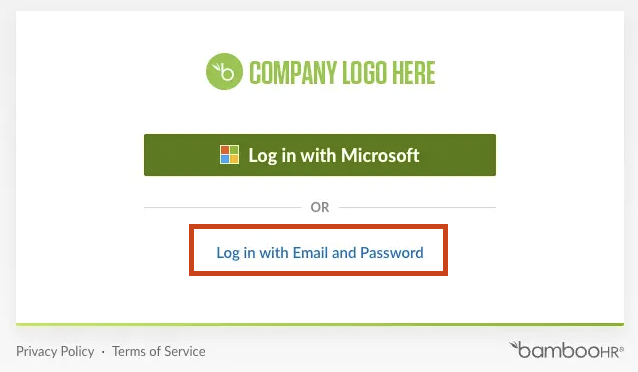
BambooHR requires a user to click the Log in with Email and Password button to sign in without SSO. The user should click on this to sign in without SSO.
Example: HiBob
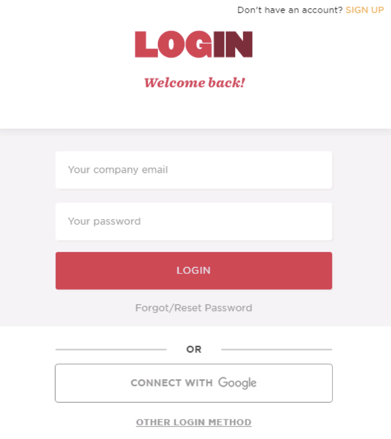
HiBob requires a user to click Other Login Method or Connect With Google to sign in with SSO. The user should not click on either of those options. Instead, they should authenticate through Finch Connect using the credentials that work without SSO.
Example: Paylocity
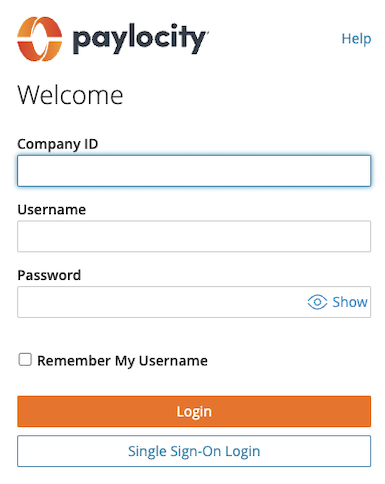
Paylocity requires a user to click Single Sign-On Login to sign in with SSO. The user should not use this option. Instead, they should authenticate through Finch Connect using the credentials that work without SSO when clicking on the Login button.