Paycor - Connect your account
Last updated: July 23, 2025
To connect your Paycor account to this application you must follow the steps in Finch Connect to authenticate via Oauth using your Paycor credentials.
Before you start
Before you begin, ensure you have one of these roles for your Paycor account: Company Administrator, Payroll Administrator, or HR Administrator.
Instructions
- Navigate to Finch Connect and select Paycor
- You'll now be presented with the following screen. Click Connect.
- A new window will open requesting that you enter your credentials for Paycor
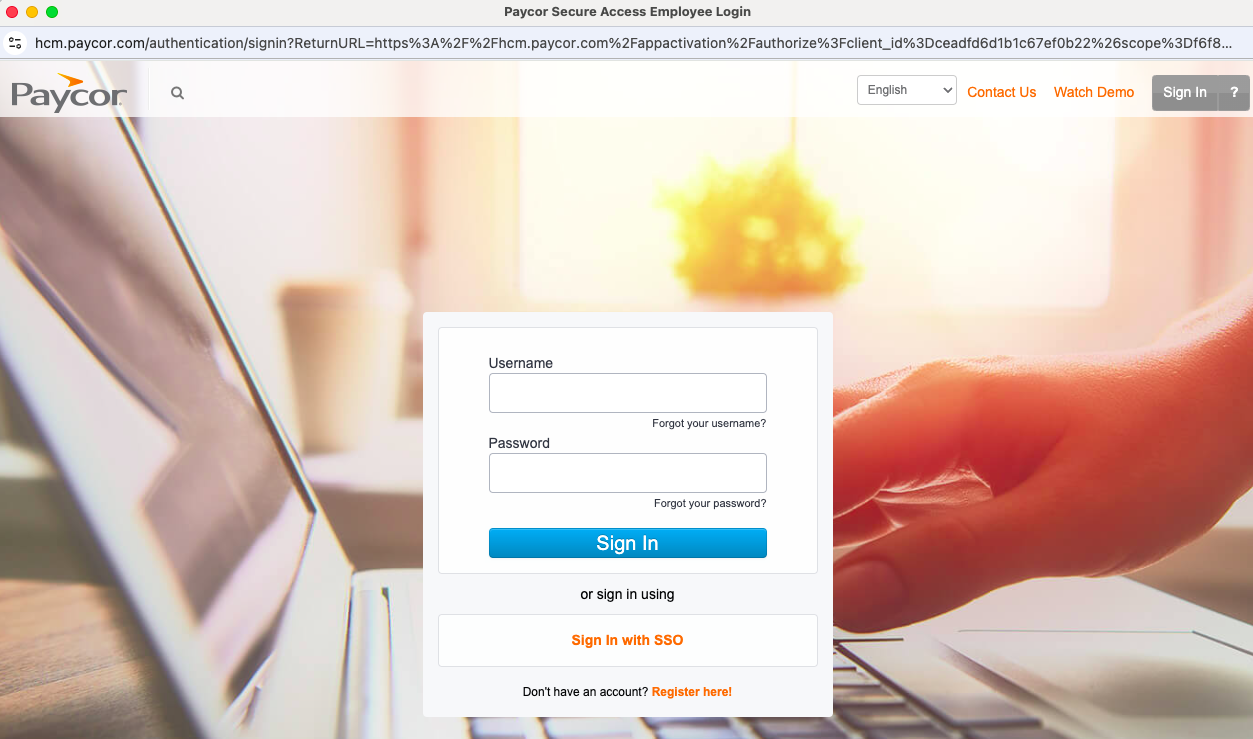
- Enter your Username or Password for your Paycor account, then click Sign In.
- Return to the Finch Connect modal. You'll receive confirmation once your connection has been set up.
If your team uses this application to sync Organization data only
The process above will have enabled the following permissions:
- View Legal Entity Basic Information
- View Legal Entity Business Names & Addresses
- View Legal Entity Departments
- View Legal Entity Work Locations
- View Legal Entity Employees (all permissions included)
If your team uses this application to sync Organization and Payroll data
The process above will have enabled the following permissions:
- View Legal Entity Basic Information
- View Legal Entity Business Names & Addresses
- View Legal Entity Departments
- View Legal Entity Work Locations
- View Legal Entity Employees (all permissions included)
- View Paystub Information (all permissions included)
- View Legal Entity Payroll Processing Data