Handling Off-Cycle Payrolls
Last updated: April 6, 2026
Finch can support off-cycle payroll files for FIS Relius with a few manual steps.
Off-Cycle Payroll Files
An off-cycle payroll file may be issued by an employer to:
Adjust an incorrect payroll
Issue final paychecks
Give bonuses / commissions
Other miscellaneous reasons
Why off-cycle files fail to process automatically in Relius
Finch will generate and attempt to deliver the off-cycle payroll file into Relius. However, the majority will fall into one of the following scenarios:
The payroll frequency and/or sequence number does not match a pay schedule for the employer in Relius.
The payroll file uses the same frequency and sequence number as the employer, but the payroll end date does not match.
The payroll will have the same identifiers (frequency, sequence, payroll date) as a previously imported file.
What happens?
Finch will deliver the file to the SFTP.
The off-cycle file will fail the Relius automation due to no matching schedule or because the frequency, sequence and payroll end date have already been imported.
The file in Relius will require review prior to importing.
If payment it is a correction that includes negative contributions, the plan must be set to allow negative amounts.
Handling negative amounts for a correction
Go to Plan Specifications > Processing > Transaction Settings > Contributions
Select Import negative contributions from payroll
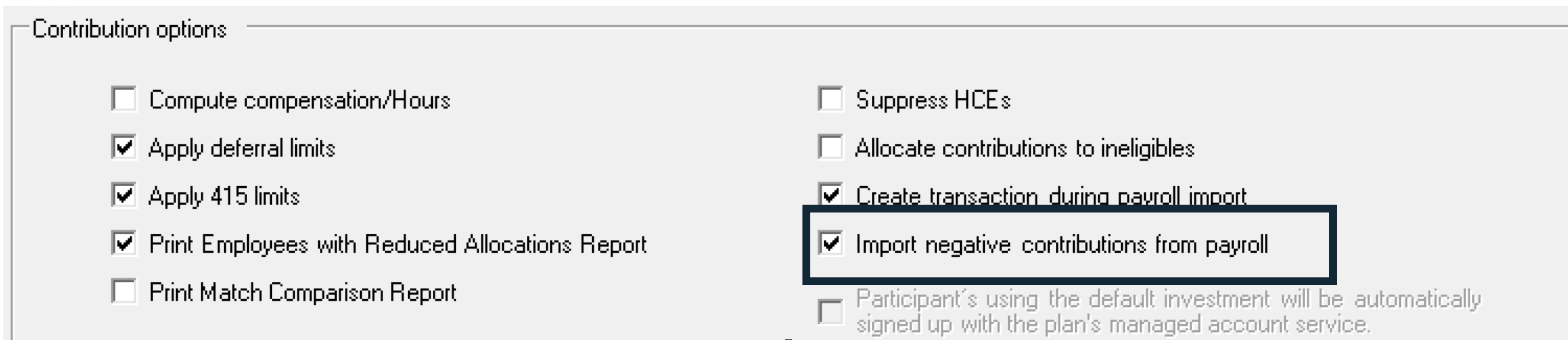
How to manually import off-cycle files
Regardless of the scenario, we recommend creating a separate pay schedule to hold the off-cycle data.
If payroll frequency and sequence number do NOT match an existing schedule for the employer...
Create a new payroll schedule named “Off-cycle”. This schedule can be used for all future off-cycle files.
When the payroll fine is downloaded and fails, open the file in Excel.
Modify the frequency, sequence number and pay end (or check) date to match an available pay date.
If the frequency does not match the original schedule, there could be an impact to Relius projections (ADP/ACP).
If the off-cycle file uses the same payroll frequency and sequence as the existing pay schedule...
Create the “extra” date in the existing schedule.
Note: If all identifiers in the file (frequency, sequence, pay end (or check) date) match the schedule used for Finch Payroll, you could import the data into the same payroll period. However, this is not recommended as the transaction will post all data in the payroll schedule for the frequency, sequence and payroll date selected.
Example: If the original file included 25 participants with contribution amounts and the new file includes an additional 10 participants, all 35 participant records will generate ledger and trade records.